import os
import geopandas as gpd
import matplotlib.pyplot as plt11 geopandas
GeoPandas is a Python library that extends the pandas library by adding support for geospatial data. In this lesson we will introduce the geopandas library to work with vector data. We will also make our first map.
About the data
Wild pigs (Sus scrofa) are a destructive invasive species in California, causing significant environmental and agricultural damage. Introduced to the region in the 1700s, they have since spread across the state, impacting native ecosystems through habitat destruction, soil disturbance due to their rooting behavior, and competition with native wildlife for food [1]. This widespread damage has made managing wild pig populations a critical issue for conservation and agricultural communities in California.
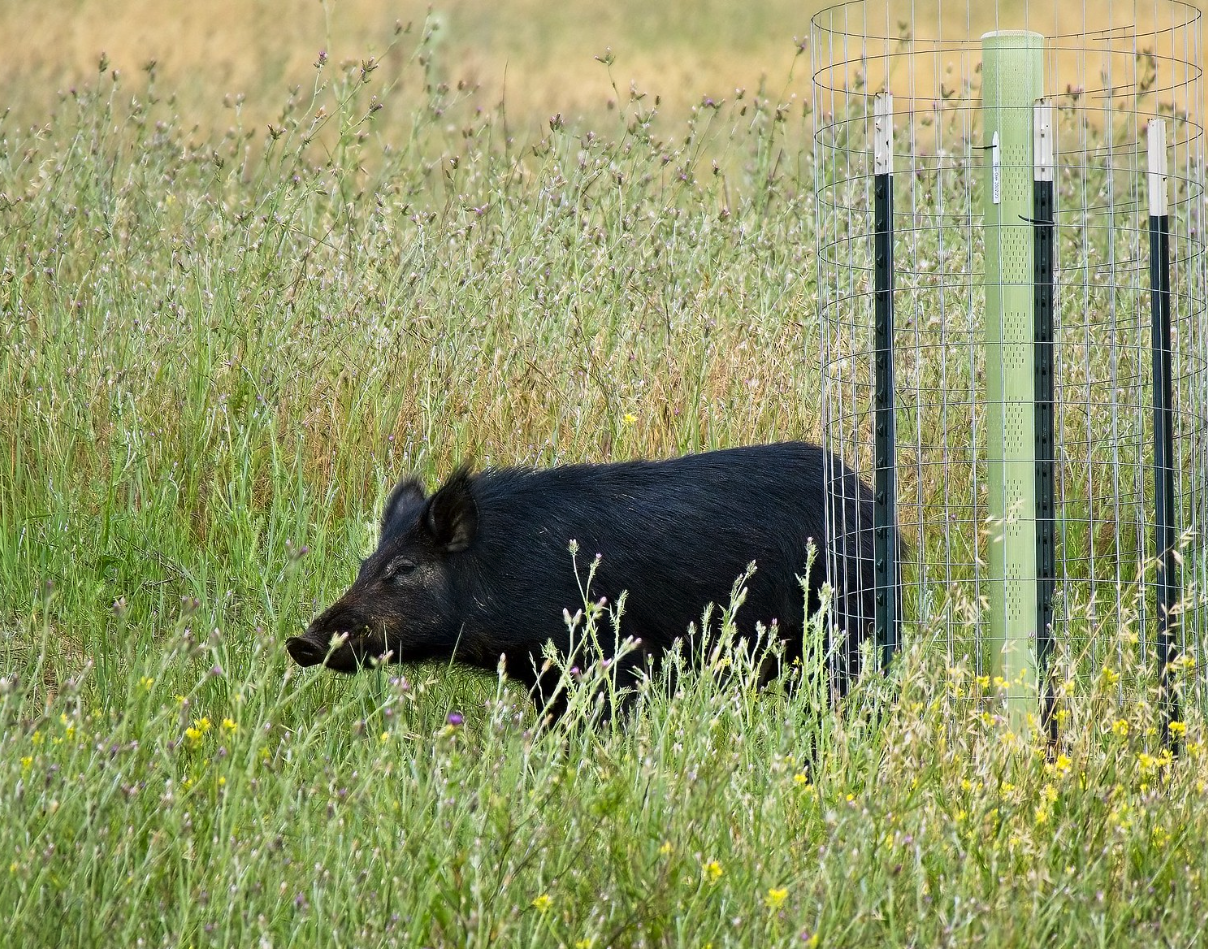
In this lesson we will use simplified point data about wild pig occurrence records in California from the Global Biodiversity Information Facility (GBIF). GBIF is an international network and data platform that provides open access to biodiversity data from around the world. By aggregating data from multiple sources, including museums, research institutions, and citizen science initiatives like iNaturalist, GBIF enables scientists, policymakers, and the public to explore and analyze species distribution and environmental trends.
The data we will use today has been simplified from the complete Sus scrofa occurrence data accessed through the GBIF website [2]. This data is shared under a Creative Commons Attribution-NonCommercial 4.0 (CC BY-NC 4.0) license.
Each row in the data is one occurrence record. The column names were shortened to fit the 10-character limit of shapefile column names:
| Column | Description |
|---|---|
gbifID |
Unique identifier of the record in GBIF. The full record is at https://www.gbif.org/occurrence/ followed by this ID. |
species |
Scientific name of the species |
state |
State where the record was made |
individual |
Number of individuals recorded |
day, month, year |
Date of the record |
inst |
Code of the institution that provided the record, for example a museum or a citizen science platform |
collection |
Code of the collection within that institution |
catalogNum |
Identifier of the record in the institution’s catalog |
identified |
Person or institution who identified the species |
geometry |
Location of the record |
We will also use a shapefile with the boundary of the state of California, which has a single feature: the outline of the state. This boundary comes from the US Census Bureau’s 2016 TIGER/Line shapefiles [3] and was converted to a different CRS for this lesson. We will use it as a base layer for our maps, to see where the wild pig records are located within California.
Both datasets are in the gbif_sus_scrofa_california and ca_state_boundary folders of the course’s shared data folder.
geopandas
In this lesson we will introduce the geopandas [4] Python package. geopandas extends pandas to work with geospatial data. This is the main package we will be working with in the next few lessons.
Let’s start by importing the necessary packages and our data:
fp = os.path.join('data','gbif_sus_scrofa_california','gbif_sus_scrofa_california.shp')
pigs = gpd.read_file(fp)
pigs.head()| gbifID | species | state | individual | day | month | year | inst | collection | catalogNum | identified | geometry | |
|---|---|---|---|---|---|---|---|---|---|---|---|---|
| 0 | 899953814 | Sus scrofa | California | NaN | 22.0 | 3.0 | 2014.0 | iNaturalist | Observations | 581956 | edwardrooks | POINT (-121.53812 37.08846) |
| 1 | 899951348 | Sus scrofa | California | NaN | 9.0 | 6.0 | 2007.0 | iNaturalist | Observations | 576047 | Bruce Freeman | POINT (-120.54942 35.47354) |
| 2 | 896560733 | Sus scrofa | California | NaN | 20.0 | 12.0 | 1937.0 | MVZ | Hild | MVZ:Hild:195 | Museum of Vertebrate Zoology, University of Ca... | POINT (-122.27063 37.87610) |
| 3 | 896559958 | Sus scrofa | California | NaN | 1.0 | 4.0 | 1969.0 | MVZ | Hild | MVZ:Hild:1213 | Museum of Vertebrate Zoology, University of Ca... | POINT (-121.82297 38.44543) |
| 4 | 896559722 | Sus scrofa | California | NaN | 1.0 | 1.0 | 1961.0 | MVZ | Hild | MVZ:Hild:1004 | Museum of Vertebrate Zoology, University of Ca... | POINT (-121.74559 38.54882) |
fp = os.path.join('data','ca_state_boundary','ca_state_boundary.shp')
ca_boundary = gpd.read_file(fp)
ca_boundary| REGION | DIVISION | STATEFP | STATENS | GEOID | STUSPS | NAME | LSAD | MTFCC | FUNCSTAT | ALAND | AWATER | INTPTLAT | INTPTLON | geometry | |
|---|---|---|---|---|---|---|---|---|---|---|---|---|---|---|---|
| 0 | 4 | 9 | 06 | 01779778 | 06 | CA | California | 00 | G4000 | A | 403501101370 | 20466718403 | +37.1551773 | -119.5434183 | MULTIPOLYGON (((-119.63473 33.26545, -119.6363... |
One shapefile = multiple files
Although the parameter for geopandas.read_file() is only the file with .shp extension, remember that we need to have at least the .shx and .dbf files in the same directory as the .shp to read in the data.
GeoSeries and GeoDataFrame
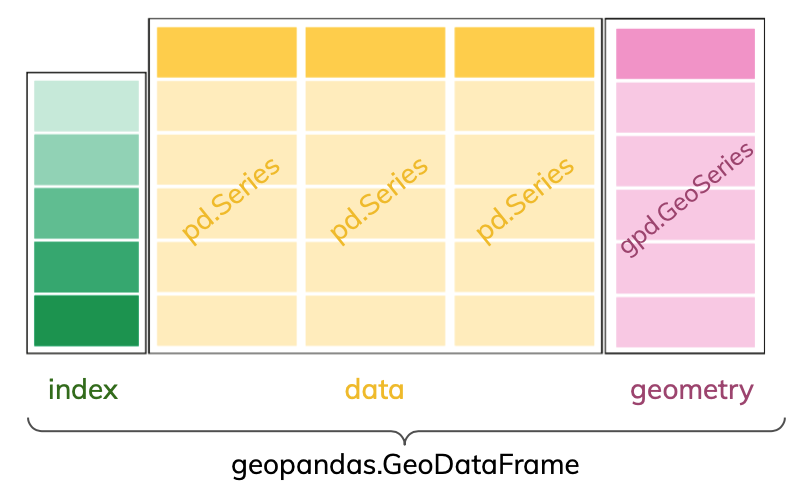
The core data structure in GeoPandas is the geopandas.GeoDataFrame. We can think of it as a pandas.DataFrame with a dedicated geometry column that can perform spatial operations.
The geometry column in a geopandas.GeoDataFrame holds the geometry (point, polygon, etc.) of each spatial feature. This geometry column is of type geopandas.GeoSeries. Columns in the geopandas.GeoDataFrame with attributes about the features are pandas.Series like in a regular pandas.DataFrame.
Example
First, notice that the rightmost column of the pigs geodataframe is a column named geometry whose values indicate points:
pigs.head(3)| gbifID | species | state | individual | day | month | year | inst | collection | catalogNum | identified | geometry | |
|---|---|---|---|---|---|---|---|---|---|---|---|---|
| 0 | 899953814 | Sus scrofa | California | NaN | 22.0 | 3.0 | 2014.0 | iNaturalist | Observations | 581956 | edwardrooks | POINT (-121.53812 37.08846) |
| 1 | 899951348 | Sus scrofa | California | NaN | 9.0 | 6.0 | 2007.0 | iNaturalist | Observations | 576047 | Bruce Freeman | POINT (-120.54942 35.47354) |
| 2 | 896560733 | Sus scrofa | California | NaN | 20.0 | 12.0 | 1937.0 | MVZ | Hild | MVZ:Hild:195 | Museum of Vertebrate Zoology, University of Ca... | POINT (-122.27063 37.87610) |
As usual, we can check the type of our objects using the type Python function:
# Check the data type of the pigs dataframe
print(type(pigs))

# Check the data type of the geometry column
print(type(pigs.geometry))

# Check the data type of the gbifID column
print(type(pigs['gbifID']))
<class 'geopandas.geodataframe.GeoDataFrame'>
<class 'geopandas.geoseries.GeoSeries'>
<class 'pandas.core.series.Series'>The data type of the geometry column is also reflected when we look at the data types of the values in each column:
# Check the data type of each column
pigs.dtypes
gbifID int64
species object
state object
individual float64
day float64
month float64
year float64
inst object
collection object
catalogNum object
identified object
geometry geometry
dtype: objectWe can also check the type of each element in the geometry column using the geom_type attribute of a geopandas.GeoDataFrame:
pigs.geom_type0 Point
1 Point
2 Point
3 Point
4 Point
...
1041 Point
1042 Point
1043 Point
1044 Point
1045 Point
Length: 1046, dtype: object
Check-in
What is the geometry type of the single feature in the California state boundary?
CRS
Two other important attributes of a geopandas.GeoDataFrame are its coordinate reference system (CRS) and its extent.
We can think of the coordinate reference system (CRS) as the instructions to locate each spatial feature of our data frame on the surface of the Earth. We access the CRS of a geopandas.GeoDataFrame using the crs attribute:
# Access the CRS of the GeoDataFrame
pigs.crs
<Geographic 2D CRS: EPSG:4326>
Name: WGS 84
Axis Info [ellipsoidal]:
- Lat[north]: Geodetic latitude (degree)
- Lon[east]: Geodetic longitude (degree)
Area of Use:
- name: World.
- bounds: (-180.0, -90.0, 180.0, 90.0)
Datum: World Geodetic System 1984 ensemble
- Ellipsoid: WGS 84
- Prime Meridian: GreenwichThe CRS for our data is the World Geodetic System 1984 (WGS84), represented by the code EPSG:4326. It uses latitude and longitude in degrees to represent places on Earth. This is a very popular CRS: it is used by GPS and Google Earth, and web-based mapping tools like Google Maps and OpenStreetMap store their coordinates in it. We can obtain more information about our CRS by accessing other attributes:
# Examine CRS details
print('Ellipsoid: ', pigs.crs.ellipsoid)
print('Datum: ', pigs.crs.datum)
print('Is geographic?: ', pigs.crs.is_geographic)
print('Is projected?: ', pigs.crs.is_projected)
Ellipsoid: WGS 84
Datum: World Geodetic System 1984 ensemble
Is geographic?: True
Is projected?: FalseExtent
The extent of the geodataframe is the bounding box covering all the spatial features in our geodataframe. This is formed by finding the points that are furthest west, east, south, and north.
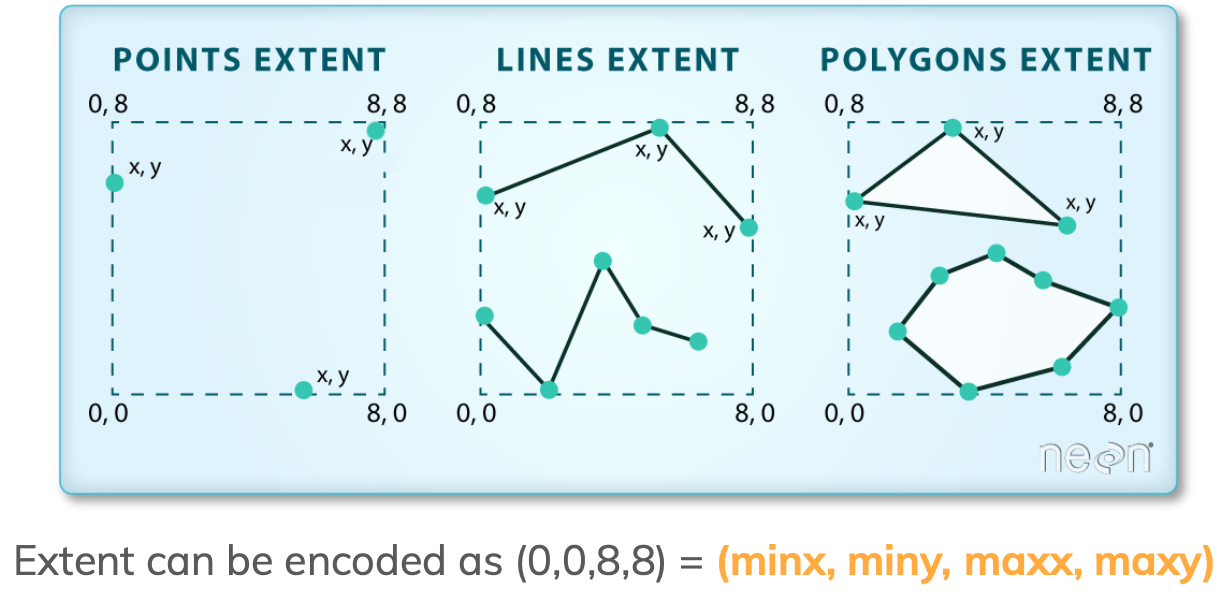
We access the extent of a geopandas.GeoDataFrame using the total_bounds attribute:
# Obtain the geographic extent of the geodataframe
pigs.total_bounds
array([-124.29448 , 32.593433, -115.4356 , 40.934296])These four numbers represent the minx, miny, maxx, maxy values for the bounds of the entire geodataframe. Notice that the \(x\) values are longitudes and the \(y\) values are latitudes: even though the CRS information above lists latitude first, geopandas follows the convention (\(x\), \(y\)) = (longitude, latitude).
Check-in
Print the CRS and extent of the California state boundary.
explore()
To explore our data interactively, we can use the explore() method. This creates an interactive map where we can zoom in and out, move around, and hover over each feature to see its attributes:
pigs.explore()Make this Notebook Trusted to load map: File -> Trust Notebook
Check-in
Zoom into a few points on the map. Each point is drawn as an exact location.
- Think about how the location of a wild pig record was obtained: an iNaturalist observation taken with a phone today vs. a museum specimen collected in the 1930s. How exact do you think each location is?
- What extra information about each point would you want to have to use this data to decide whether to close a trail or not?
Check-in
Records without a geometry are silently left out of maps like the one above.
- Which records do you think are most likely to be missing coordinates? Check your guess with
pigs[pigs.geometry.isna()]. - Describe a situation where these records would still be relevant to an analysis.
Data wrangling
GeoPandas is conveniently built on top of pandas, so we may use everything we have learned about data selection, wrangling, and modification for a pandas.DataFrame to wrangle geopandas.GeoDataFrames.
Example
We only want to use recent data for wild pig observations. Before selecting the data, let’s look at which years it covers.
Check-in
Before running the next cell, write down your prediction: when do you expect the earliest wild pig record in our data to be?
# Examine pig observations by year
pigs['year'].value_counts().sort_index()
year
1818.0 31
1910.0 1
1925.0 1
1927.0 4
1929.0 3
...
2019.0 101
2020.0 159
2021.0 164
2022.0 185
2023.0 98
Name: count, Length: 61, dtype: int64
Check-in
- Does the earliest year match your prediction? Do you trust it?
- Run
pigs[pigs['year'] == 1818]. What do these records have in common? How much do you trust the year now, and where could you check it?
In this analysis, we will use data from 2020 onwards. We can use our usual data selection to subset it:
# Select data from 2020 onwards
pigs_recent = pigs[pigs['year'] >= 2020]

# Check length of original dataframe
print('Total number of observations: ' , len(pigs))

# Check length of new dataframe
print('Number of observations since 2020: ' , len(pigs_recent))
Total number of observations: 1046
Number of observations since 2020: 606Notice that this selection also leaves out the records without a year.
Visualizing our data
plot()
Similarly to a pandas.DataFrame, a geopandas.GeoDataFrame has a plot() method that we can call directly to create a quick, static view of our data. The geospatial information of the geopandas.GeoDataFrame will be used to create the axes of the plot.
Example
Let’s take a quick look at our recent pigs data:
pigs_recent.plot()
Using matplotlib
Going forward, we will make more complex visualizations where we add different layers to a map and customize it. To do this, we will use matplotlib via its pyplot interface for creating visualizations. You can review the matplotlib basics in this previous lesson.
Example
When using matplotlib, it can be useful to think of creating a plot as adding layers to an axes. In this case, the first layer that we want to add to our axes is the pigs_recent point data. We can plot our data using matplotlib like this:
# Initialize empty figure and axes
fig, ax = plt.subplots()

# Add pigs point plot to our figure's axes
pigs_recent.plot(ax=ax)

# Display figure
plt.show()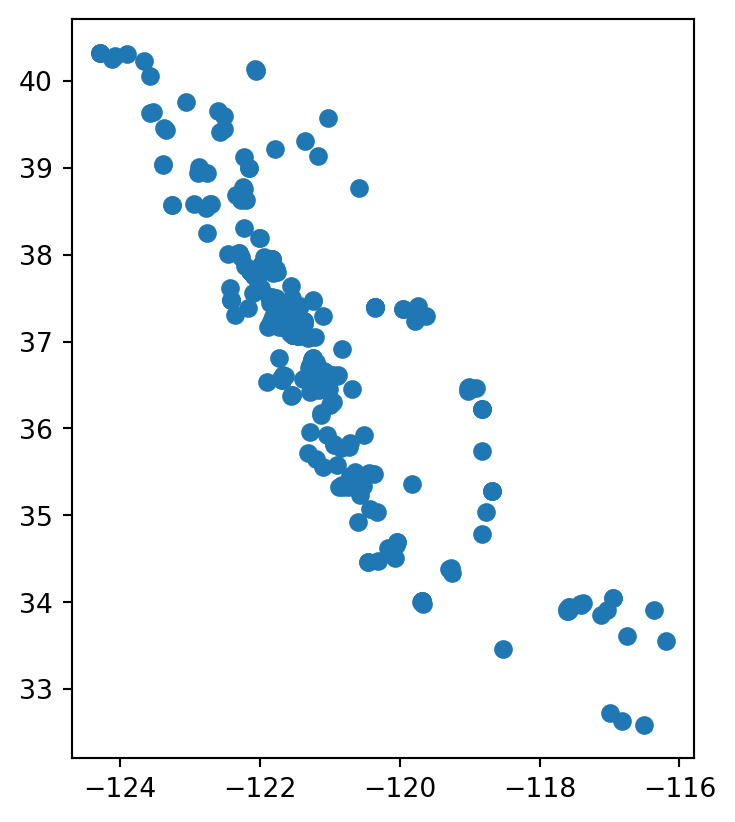
Then some simple customization for our pigs data could look like this:
# Initialize empty figure
fig, ax = plt.subplots()

# Add data to axes
pigs_recent.plot(ax=ax,         # Add plot to axes
                 alpha=0.5,     # Adjust transparency
                 color='brown'  # Update point color
                 )

# Update axes
ax.set_title('Reported "Sus scrofa" sightings in CA (2020-2023)')
ax.set_xlabel('Longitude')
ax.set_ylabel('Latitude')

# Display figure
plt.show()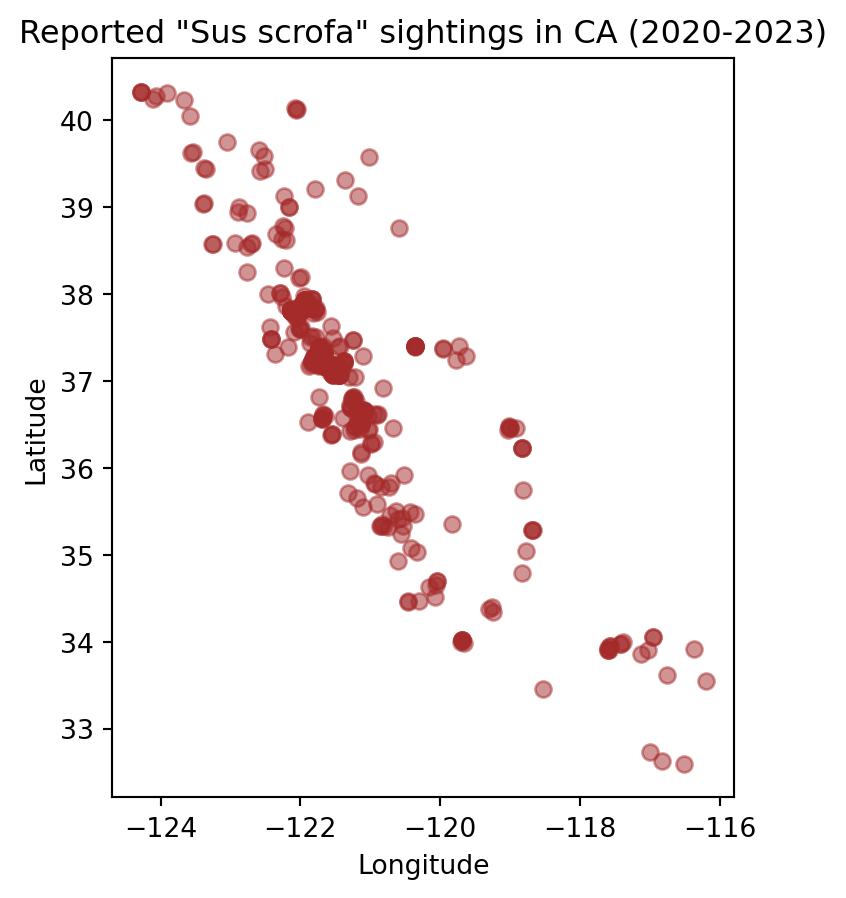
Exercises
Exercise 1
Check that both layers have the same CRS using
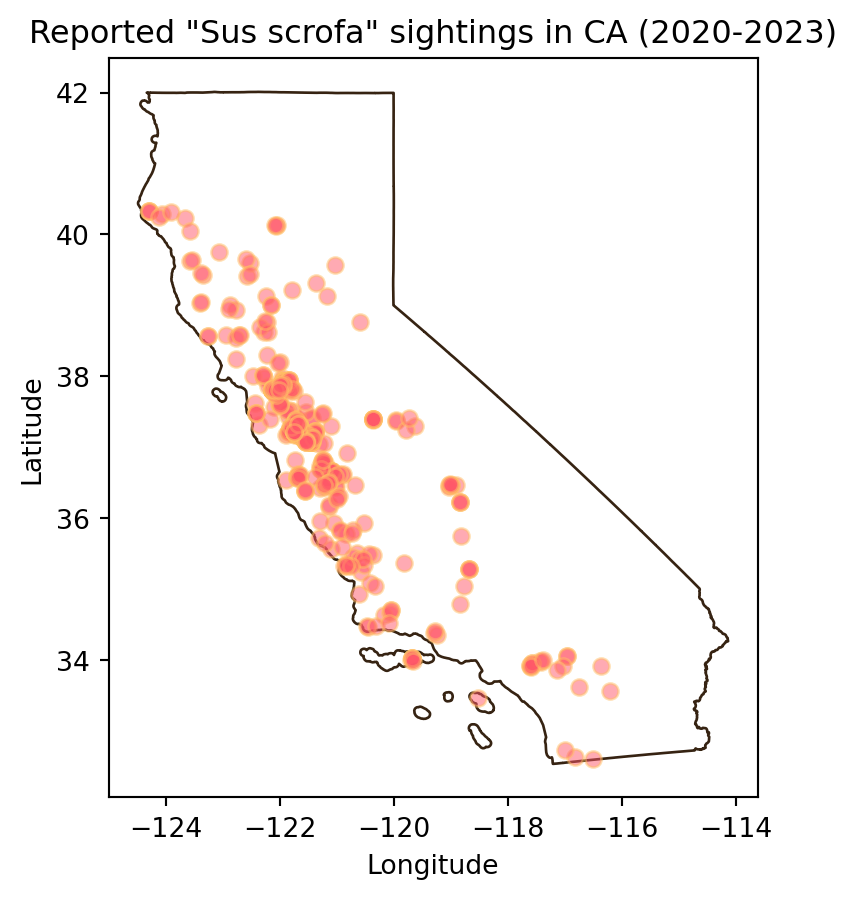
pigs_recent.crs == ca_boundary.crs.Add the California state boundary to the plot so the boundary appears behind the points as below. Don’t forget to customize your graph!
Write a short caption for your map describing the spatial distribution of observations. What patterns or clusters do you notice?
Exercise 2
A local news site publishes our final map with the headline “Wild pigs concentrated around the Bay Area”.
Discuss with a partner:
- Does our map support this headline?
- Who produced the records in our map, and how might that shape where the points are? Perhaps explore the
instcolumn. - Explain what our map can and cannot tell us about where wild pigs are in California. Then suggest a better headline.
References
[1]
J. A. Finzel and R. A. Bladwin, “Wild Pigs - Pest Notes Publication 74170.” University of California Agriculture; Natural Resources - Satewide Integrated Pest Management Program, Jul. 2015. Available: https://ipm.ucanr.edu/legacy_assets/PDF/PESTNOTES/pnwildpigs.pdf. [Accessed: Oct. 22, 2024]
[2]
GBIF.Org User, “Occurrence Download.” The Global Biodiversity Information Facility, 2023. doi: 10.15468/DL.QAVHWP. Available: https://www.gbif.org/occurrence/download/0023426-231002084531237
[3]
U.S. Census Bureau, “TIGER/Line Shapefiles: States (2016).” U.S. Census Bureau, 2016. Available: https://www.census.gov/geographies/mapping-files/time-series/geo/tiger-line-file.2016.html. [Accessed: Oct. 21, 2026]
[4]
K. Jordahl et al., “Geopandas/geopandas: v0.8.1.” Zenodo, Jul. 2020. doi: 10.5281/ZENODO.3946761. Available: https://zenodo.org/record/3946761. [Accessed: Oct. 22, 2024]