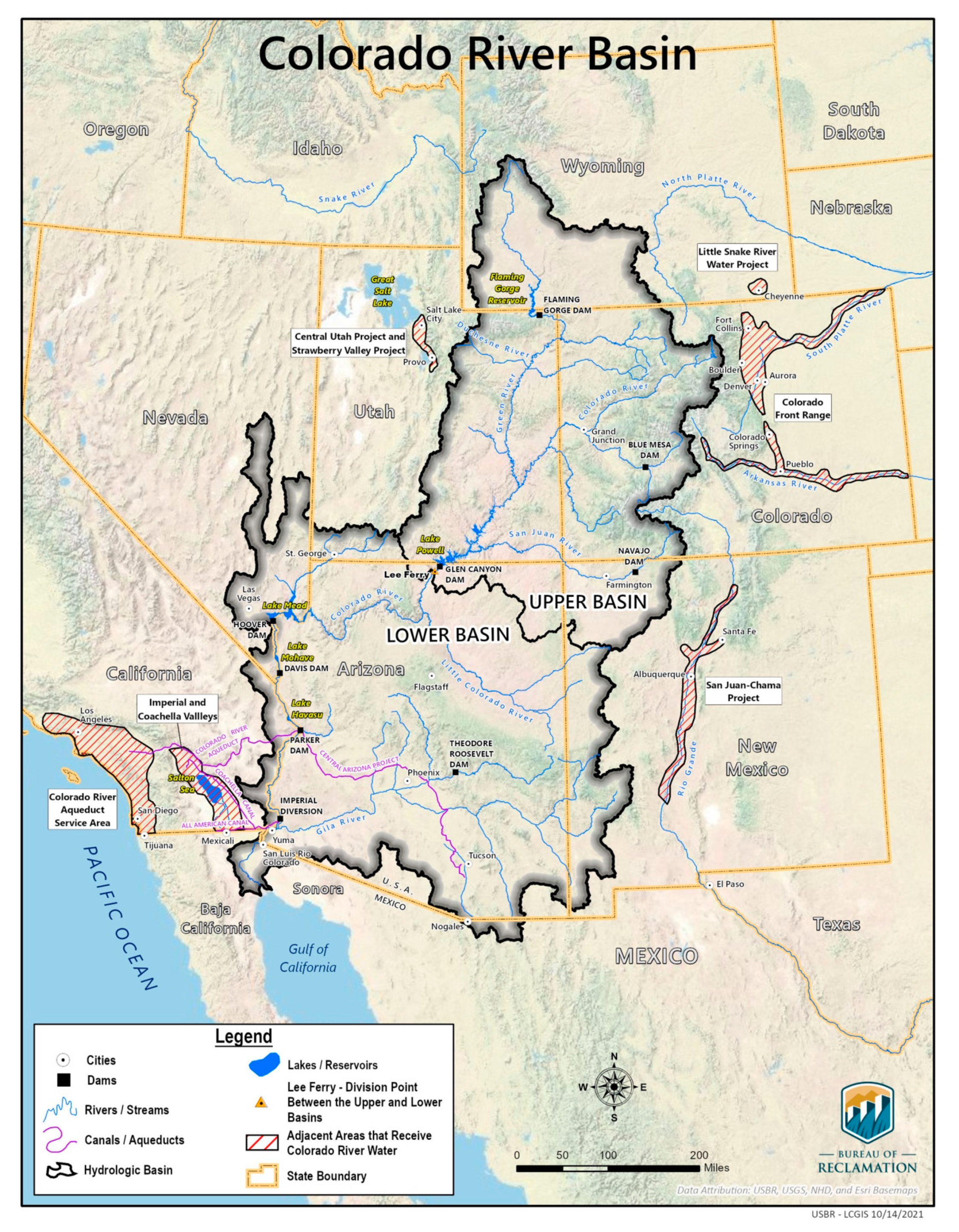
This discussion section will guide you through exploring data about water-related conflicts at the Colorado River Basin using data from the U.S. Geological Survey (USGS). In this discussion section, you will:
Practice version control using git via the terminal
Use methods to work with pandas.Series of strings using the .str accessor
Practice method chaining
Setup
In the workbench-1 server, start a new JupyterLab session or access an active one.
In the terminal, use cd to navigate into the eds220-discussion-sections directory. Use pwd to verify eds220-discussion-sections is your current working directory.
Create a new Python notebook inside your eds220-discussion-sections directory and rename it to section-2-co-basin-water-conflicts.ipynb.
Use the terminal to stage, commit, and push this file to the remote repository. Remember:
git status : check git status
git add FILE-NAME : stage updated file
git status : check git status again to confirm
git commit -m "Commit message" : commit with message
git pull : check local repo is up to date (best practice)
git push : push changes to upstream repository
CHECK IN WITH YOUR TEAM
MAKE SURE YOU’VE ALL SUCCESSFULLY SET UP YOUR NOTEBOOKS BEFORE CONTINUING
General directions
Add comments in each one of your code cells.
Include markdown cells in between your code cells to add titles and information.
Indications about when to commit and push changes are included, but you are encouraged to commit and push more often.
The dataset is a CSV file containing conflict or crisis events around water resource management in the Colorado River Basin. The Colorado River Basin, inhabited by several Native American tribes for centuries, is a crucial water source in the southwestern United States and northern Mexico, supporting over 40 million people, extensive agricultural lands, and diverse ecosystems. Its management is vital due to the region’s arid climate and the competing demands for water, leading to significant challenges related to water allocation and conservation.
Colorado River Basin. U.S. Bureau of Reclamation.
1. Archive exploration
Look through the dataset’s description in the ScienceBase repository. Find the following information:
Where was the data collected from?
During what time frame were the observations in the dataset collected?
What was the author’s perceived value of this dataset?
In a markdown cell, use your answers to the previous questions to add a brief description of the dataset. Briefly discuss anything else that seems relevant to you. Include a citation, date of access, and a link to the archive.
Take a look at the data’s metadata by clicking on the “View” icon of the Coded Events Colorado River Basin Water Conflict Table Metadata.xml file.
check git status -> stage changes -> check git status -> commit with message -> pull -> push changes
2. Data loading
Create a new directory data/ inside your eds220-discussion-sections directory.
Download the Colorado River Basin Water Conflict Table.csv file from the Science Base repository and upload it into the data/ folder.
Update the .gitignore file of your eds220-discussion-sections so it ignores the data/ folder. Verify that git is ignoring the data file.
You have at least three ways of doing this:
Via GitHub: This is how we previously did it in class. If you update the .gitignore file via GitHub, don’t forget to run git pull when you go back to your repository in the workbench.
Via VSCode or Positron: you can directly edit the .gitignore and push your changes.
Via the terminal: in JupyterLab .gitignore is a hidden file that’s invisible from the file navigation panel. You can edit it through the terminal.
Load the data into your section-2-co-basin-water-conflicts.ipynb notebook. Name your data frame variable df.
3. Preliminary data exploration
Set pandas to display all columns in the data frame.
Using pandas methods, obtain preliminary information and explore this data frame in at least four different ways.
CHECK IN WITH YOUR TEAM 🙌
YOU CAN SLACK THEM TO LET THEM KNOW YOU’RE READY FOR THE SESSION OR BRING UP ANY QUESTIONS
MAKE SURE YOU’VE ALL SUCCESSFULLY LOADED THE DATA AND DONE A PRELIMINARY EXPLORATION BEFORE CONTINUING
check git status -> stage changes -> check git status -> commit with message -> pull -> push changes
4. Location column descriptions
In these exercises we will work with columns in the data frame pertaining to the location of an event. Before continuing, read the following column descriptions from the .xml metadata file:
Column
Description
Place
Where the event actually occurred, but also where the event’s direct implications are felt most directly. When the researchers reviewed the articles, they were looking for mentions of specific places impacted by the events. Empty cell indicates a place was not coded for this event. NA indicates a place is not referenced in the event text.
State
State Name coded from Place field. Empty cell indicates a state was not coded for this event or that the article was not coded.
Conflict Present
Binary response to “Is a conflict present?” Conflict is defined here as an incompatibility of goals and various attempts of any present parties to control each other’s choices. When the researchers reviewed the articles, they were looking for evidence of this behavior in the event explained.
5. String accessor for pandas.Series
In the following exercises we will work with pandas.Series whose values are strings. This is a common scenario, so pandas has special string methods for this kind of series. These methods are accessed via the str accessor. Accessors provide additional functionality for working with specific kinds of data (in this case, strings).
The code below gives a brief demonstration of using the str accessor to use the split() method for pandas.Series. Carefully read the code.
# CELL 1import numpy as npimport pandas as pd # Example seriess = pd.Series(['California; Nevada', 'Arizona', np.nan, 'Nevada; Utah'])s
What could be a challenge to finding the states that have reported having water conflicts (without repetition)?
7. Brainstorm
Individually, write downm step-by-step instructions on how you would wrangle the data frame to obtain an array (without repetition) of the state codes in which a water conflict has been reported. Would you keep or remove NA values and why? It’s ok if you don’t know how to code each step - it’s way more important to have an idea of what you would like to do.
Discuss your step-by-step instructions with your team.
The next exercises will guide you through finding these unique state codes. There are many ways of extracting this information. The one presented here might not be the same way you thought about doing it - that’s ok! This one was designed to practice using the .str accessor in a pandas.Series.
8. Exploratory wrangling
Perform the following wrangling:
select the State column and the rows corresponding to water conflicts occurring
split the strings in the column by the delimiter ;
explode the resulting pandas.Series to have each element of a list as a separate row
find the unique string values in the resulting pandas.Series, keeping the NAs
CHECK IN WITH YOUR TEAM: IS EVERY STEP CLEAR?
check git status -> stage changes -> check git status -> commit with message -> pull -> push changes
9. Find unique state codes
Discuss with your team: Why do some state codes seem to be repeated? What would we need to do to get the correct strings?
Update your code to obtain an array of codes (without repetition) of the states mentioned in the news articles about water conflicts in the Colorado River Basin. Hint:str.strip().
Once your code works, rewrite it as a single method chain, with one method per line inside parentheses.
10. Visualize data exploration & discussion
Create a bar plot showing the number of conflicts reported per state and write a description of these results. Include a bar for NA values.
Using the dataset’s metadata, what are possible reasons a state might be missing? How does this affect what we can claim for our array of states?
Zoom out: every dataset you will work with was created by people, instruments or models, through choices about what to record and how.
In this section, which data issues did you find only because you looked closely (for example, extra spaces or missing values)? What would have happened to your results if you hadn’t noticed them?
What are a couple of checks you could make a habit of whenever you start working with a new dataset?
END OF SESSION
check git status -> stage changes -> check git status -> commit with message -> pull -> push changes